자바스크립트로 주간(일~토) 셀렉트 박스 만들기
년도와 월을 선택하면 해당 년/월에 포함 되어있는 주 시작일과 종료일을 셀렉트박스로 만들게 하는 함수 입니다.
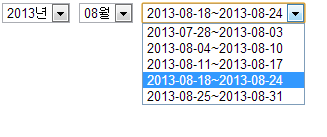
아래 이미지와 같은 모습이며, 예제 보기를 통해서 구현된 페이지를 확인 할 수 있습니다.
{% figure [caption:“자바스크립트로 주간(일~토) 셀렉트 박스 모습”] %}
 {% endfigure %}
Code
function makeWeekSelectOptions() {
  var year = $('#sh_year').val()
  var month = $('#sh_month').val()

  var today = new Date()

  var sdate = new Date(year, month - 1, 01)
  var lastDay = new Date(sdate.getFullYear(), sdate.getMonth() + 1, 0).getDate()
  var endDate = new Date(sdate.getFullYear(), sdate.getMonth(), lastDay)

  var week = sdate.getDay()
  sdate.setDate(sdate.getDate() - week)
  var edate = new Date(sdate.getFullYear(), sdate.getMonth(), sdate.getDate())

  var obj = document.getElementById('sh_week')
  obj.options.length = 0
  var seled = ''
  while (endDate.getTime() >= edate.getTime()) {
    var sYear = sdate.getFullYear()
    var sMonth = sdate.getMonth() + 1
    var sDay = sdate.getDate()

    sMonth = sMonth < 10 ? '0' + sMonth : sMonth
    sDay = sDay < 10 ? '0' + sDay : sDay

    var stxt = sYear + '-' + sMonth + '-' + sDay

    edate.setDate(sdate.getDate() + 6)

    var eYear = edate.getFullYear()
    var eMonth = edate.getMonth() + 1
    var eDay = edate.getDate()

    eMonth = eMonth < 10 ? '0' + eMonth : eMonth
    eDay = eDay < 10 ? '0' + eDay : eDay

    var etxt = eYear + '-' + eMonth + '-' + eDay

    if (today.getTime() >= sdate.getTime() && today.getTime() <= edate.getTime()) {
      seled = stxt + '|' + etxt
    }

    obj.options[obj.options.length] = new Option(stxt + '~' + etxt, stxt + '|' + etxt)

    sdate = new Date(edate.getFullYear(), edate.getMonth(), edate.getDate() + 1)
    edate = new Date(sdate.getFullYear(), sdate.getMonth(), sdate.getDate())
  }

  if (seled) obj.value = seled
}<select name="sh_year" id="sh_year" onchange="makeWeekSelectOptions();">
<option value="2013" selected="selected">2013년</option>
</select>
<select name="sh_month" id="sh_month" onchange="makeWeekSelectOptions();">
<option value="01">01월</option>
<option value="02">02월</option>
<option value="03">03월</option>
<option value="04">04월</option>
<option value="05">05월</option>
<option value="06">06월</option>
<option value="07">07월</option>
<option value="08" selected="selected">08월</option>
<option value="09">09월</option>
<option value="10">10월</option>
<option value="11">11월</option>
<option value="12">12월</option>
</select>
<select name="sh_week" id="sh_week"></select>이 저작물은 크리에이티브 커먼즈 저작자표시-비영리-동일조건변경허락 4.0 국제 라이선스 에 따라 이용할 수 있습니다.

Comments
Related Posts

datepicker 시작일과 종료일 설정 시 사용하기 좋은 팁
웹 프로그래밍을 하다 보면 가끔 시작일과 종료일을 입력받는 프로그램을 제작하곤 한다. 사용자에게 날짜를 입력받아야 하는데 텍스트 박스만 떡하니 놔두면 사용자가 제대로 된 데이터를…
munilive · JQuery : 클래스 이름만으로 페이지 전체에 롤오버 이미지 쉽게 적용하기
작업중에 얻은 소스를 변경한것. 기존에는 지정한 파일 확장자의 이미지 만을 사용했다면 변경한 것에는 이미지 파일에 상관 없이 클래스명이 일때 무조건 확장자 앞에 의 유무에…
munilive ·